This project walks through the complete pipeline to train, quantize, convert, and benchmark an AkidaNet model on the PlantVillage dataset for Akida 1 hardware. PlantVillage contains 54,303 images of healthy and diseased plant leaves across 38 categories (14 crop species × multiple disease types plus healthy variants). The task is a 38-class image classification problem: given a 224×224 RGB image of a leaf, identify the crop species and disease (or healthy state).
Run Time: ~20 minutes with training included / ~15 minutes with training skipped
Level: Beginner–Intermediate
Akida 1.0 — Runs in software simulation; no physical Akida device required
This project walks through the complete pipeline to train, quantize, convert, and benchmark an AkidaNet model on the PlantVillage dataset for Akida 1 hardware. PlantVillage contains 54,303 images of healthy and diseased plant leaves across 38 categories (14 crop species × multiple disease types plus healthy variants). The task is a 38-class image classification problem: given a 224×224 RGB image of a leaf, identify the crop species and disease (or healthy state).
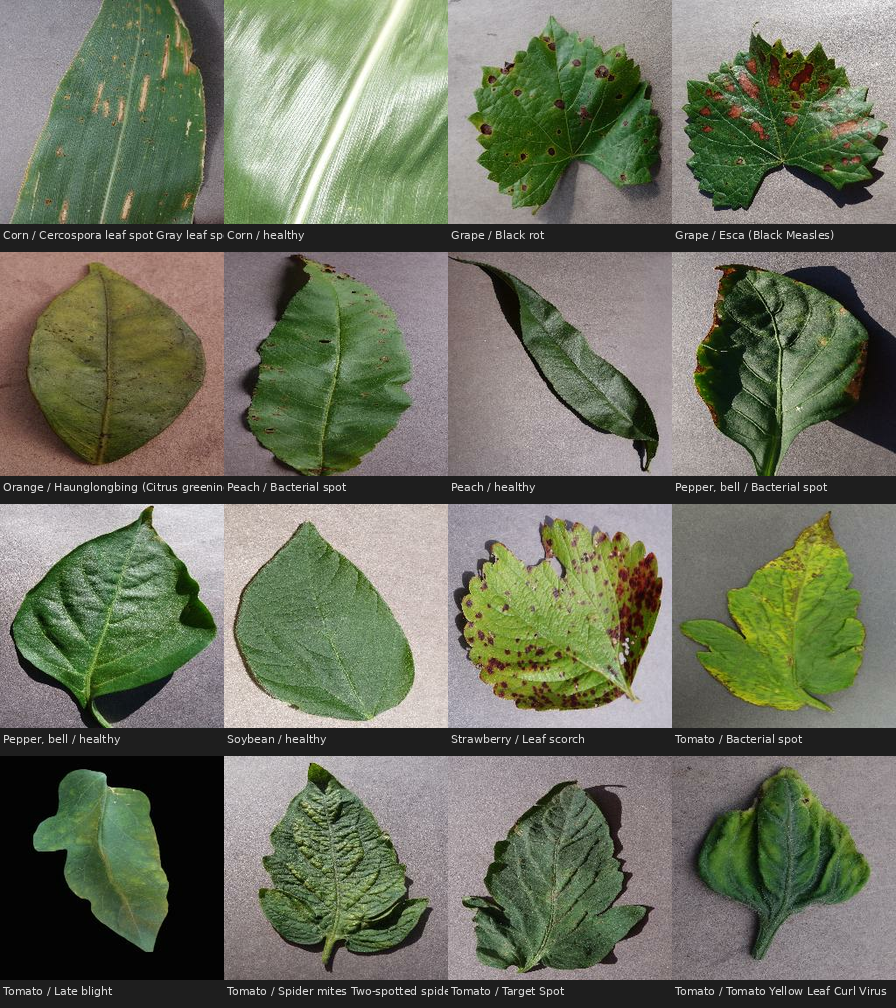
16 randomly selected samples from the 38-class dataset, illustrating the variety of plant species and disease types.
Model Card
Float acc.
QAT acc.
Akida acc.
Sparsity
Params
99.61%
99.43%
99.43%
54.58%
1,156,054
The pipeline has four stages:
Stage
What happens
1. Float training
Standard float32 training from scratch, 10 epochs
2. Post-training quantization
cnn2snn reduces the model to 4-bit weights and activations (8-bit input)
3. Quantization-aware tuning
2 epochs of fine-tuning recover the accuracy lost to quantization
4. Conversion to Akida
The quantized model compiles to a .fbz file that runs on Akida
Dataset
The PlantVillage dataset is loaded via TensorFlow Datasets (plant_village). On the first run, TFDS will automatically download and prepare the dataset (~800 MB) to the data path — by default ./data/plant_village, or the path you provide with --data / -d. Subsequent runs read from the local cache.
The dataset is split 80/10/10 (train/val/test). Images are resized from variable original sizes to 224×224 RGB and delivered as uint8 pixel values (0–255). Training applies random horizontal flip, brightness jitter, and contrast jitter for regularisation.
To pre-download the dataset without running training:
bash
python -c "import tensorflow_datasets as tfds; tfds.load('plant_village', data_dir='./data/plant_village')"
Original dataset licensed under CC0 1.0 (public domain):
J, ARUN PANDIAN; GOPAL, GEETHARAMANI (2019), "Data for: Identification of Plant Leaf Diseases Using a 9-layer Deep Convolutional Neural Network", Mendeley Data, V1, doi: 10.17632/tywbtsjrjv.1
Requirements
Python 3.10 – 3.12 on Linux or Windows
A modern GPU is recommended for the training steps; without one, the pretrained models provided in the repository can be used instead (see below)
💡 We recommend using your preference of docker or a virtual environment such as venv or conda. For example, to create and activate an appropriate virtual environment with conda:
This example lives in the public brainchip_devhub repository. With your container or virtual environment active, all requirements along with utilities local to the repository are installed by running the following at the top level of the repository (you can check what packages will be installed in the pyproject.toml file):
bash
git clone https://github.com/Brainchip-Inc/brainchip_devhub.git
cd brainchip_devhub
pip install -v -e .
Pretrained model weights (.h5, .fbz) are stored directly in the repository, tracked with Git LFS rather than regular git. If you cloned the repo without LFS support, these files will show up as small text pointers instead of real weights. With git-lfs available (on a Linux machine, one option is sudo apt install git-lfs), pull the actual model files:
bash
git lfs install   # one-time setup per machine
git lfs pull      # fetch the real model files for this clone
Then move into the example directory — every command below runs from here:
bash
cd akida1/model_zoo/plant_village
📓 Prefer to run this as a notebook?
plant_village_notebook_training.ipynb, in the directory you just entered, walks through the complete training pipeline end-to-end. It is written to expose and explain the Akida-specific aspects of the workflow: how the model is constructed for Akida compatibility, what the quantization constraints mean in practice, and what the conversion step does. Start here if you want to understand why the pipeline is structured the way it is
Walkthrough
The walkthrough below uses the scripts provided in the example directory — the same files that plant_village_train.sh runs in sequence. Each stage is a single command; each command loads a model file and saves a model file to models/, so you can stop, inspect, and resume at any point.
File
Role
plant_village_model.py
Builds the untrained AkidaNet model and saves it
plant_village_train.py
Trains a given model (float or quantized)
plant_village_eval.py
Evaluates a given model on the held-out test set — Keras .h5 or Akida .fbz
plant_village_data.py
Dataset loading and augmentation (used by the others)
The scripts are intentionally self-contained. Readability and reproducibility take priority, so reading them alongside this walkthrough is a good way to see exactly what each stage does.
Model
The model is based on AkidaNet (akida_models.akidanet_imagenet) with:
Width multiplier alpha = 0.5 (provides sufficient capacity for 38 classes while remaining efficient on Akida 1 hardware)
Input resolution 224 × 224 RGB
38-class classification head (replacing the ImageNet top)
Input scaling (255, 0) built into the model (the pipeline delivers raw uint8 pixel values and the model normalises them internally)
AkidaNet is specifically designed for Akida hardware: it uses only operations that map efficiently to Akida Neural Processors (NPs), including depthwise separable convolutions and ReLU activations.
The model is trained in full float32 precision for 10 epochs using the Adam optimiser and sparse categorical cross-entropy loss (with from_logits=True, since the model head outputs raw logits rather than softmax probabilities). The learning rate follows an exponential decay schedule, starting at 1e-3 and decaying to approximately 1e-5 by the final epoch.
Around 10 minutes on a modern GPU; considerably longer on CPU.
Skipping training? The trained reference models are provided in the pretrained_models/ folder (fetched by git lfs pull during setup). Copy them into models/ and every later command works unchanged:
Post-training quantization (PTQ) via cnn2snn quantize converts the model to fixed-point arithmetic:
Input: 8-bit (-i 8)
Weights: 4-bit (-w 4)
Activations: 4-bit (-a 4)
4-bit quantization must be used to be compatible with Akida 1 hardware. Note though that the first layer (both its inputs and weights) can be 8-bit.
bash
cnn2snn quantize -m models/akidanet_plant_village.h5 -i 8 -w 4 -a 4
This writes the quantized model to models/akidanet_plant_village_iq8_wq4_aq4.h5. Quantizing a model after training like this can slightly reduce accuracy (especially at 4-bits as here) because the model was trained with continuous weights but is now evaluated with discrete values. Evaluate it to see the effect:
Expected result: ~68% a substantial drop from the float baseline. The next stage recovers it.
Quantization-Aware Training (QAT)
We can run Quantization-Aware Training (QAT) to recover most of the drop in accuracy. QAT fine-tunes the quantized model for a few epochs (here, 2) at a reduced learning rate (1e-4). Note that, although it can sound intimidating, QAT with BrainChip's quantization tools is no more complex than simply sending the quantized model back through the same training pipeline that was used to prepare the float model in the first place:
Expected result: ~99.43% most of the accuracy is recovered, at 4-bit precision.
Conversion to Akida Format
cnn2snn convert compiles the quantized Keras model into an Akida .fbz model that can be loaded and executed directly on AKD1500 hardware. The converter verifies hardware compatibility and maps each layer to its corresponding Akida primitive:
This produces models/akidanet_plant_village_qat.fbz.
Evaluation of Akida Model
We now run evaluation through the Akida model, to check that accuracy is comparable to that obtained from the quantized tf_keras model. If an Akida 1 hardware device is connected, it will be used for inference; if not, the code will fall back to using the software backend: this delivers a bit-accurate simulation of the results that will be obtained when running the model on hardware.
Note this is the same eval script as before - it detects the .fbz extension and runs the model through the Akida runtime:
The full test set takes around 9 minutes on the software backend.
Expected result: ~99.43% - matching the quantized Keras model, as expected.
Activation Sparsity (Optional)
Akida hardware skips computation for zero-valued activations, so activation sparsity directly reduces both energy consumption and inference latency. Below we measure per-layer sparsity on a 100-sample calibration batch drawn from the training set. This step lives in Python rather than a script. Run it in a Python session from the example directory (it is also the "Activation Sparsity" cell in the notebook):
python
from akida import Model
from akida_models.sparsity import compute_sparsity
from brainchip_utils.plot_utils import pretty_print_sparsity
from plant_village_data import get_samples

INPUT_SHAPE = (224, 224, 3)
NUM_SAMPLES = 100

akida_model = Model('models/akidanet_plant_village_qat.fbz')
samples = get_samples('./data/plant_village', input_shape=INPUT_SHAPE, num_samples=NUM_SAMPLES)
sparsity_dict = compute_sparsity(akida_model, samples=samples)
pretty_print_sparsity(sparsity_dict)
Per-layer sparsity ranges from ~32% at the first conv to well over 70% deeper in the network, with a mean of 54.58%
Run the full pipeline in one shot
For straightforward reproduction of the training and evaluation results, the stages above can be run in a single command:
bash
bash plant_village_train.sh [DATADIR]
The optional DATADIR argument overrides the default dataset location (./data/plant_village). That will take about 20 minutes to run if a modern GPU is available. Its final step (plant_village_benchmark.py) covers hardware benchmarking — see the companion project below.
Summary
The table below compares test accuracy across the model variants. The goal is that QAT and Akida accuracy remain close to the float baseline:
Float
PTQ
QAT
Akida
Test accuracy
99.61%
~68%
99.43%
99.43%
Quantization to 4 bits cost 0.18 points, and conversion to Akida cost nothing; the .fbz model matches the quantized Keras model.
What's next: run it on hardware
Everything above ran in software simulation. Here is what this model does on a physical AKD1500:
Mapping
NPs
Latency (ms)
Total Power (mW)
Total Energy (mJ/inf)
Minimal
34
91.0
154.7
14.8
AllNPs
59
45.8
196.2
9.4
The table above shows power measurements captured during inference on hardware. In Minimal mapping the model is scheduled onto the fewest NPs required, keeping power consumption low. Switching to AllNps spreads the model across more NPs, which results in a slight increase in power during inference but a proportional reduction in latency.
Have an Akida board? The companion [HARDWARE] project walks through evaluation of model accuracy on Akida and benchmarking of model latency and power.